-36x36.jpg)



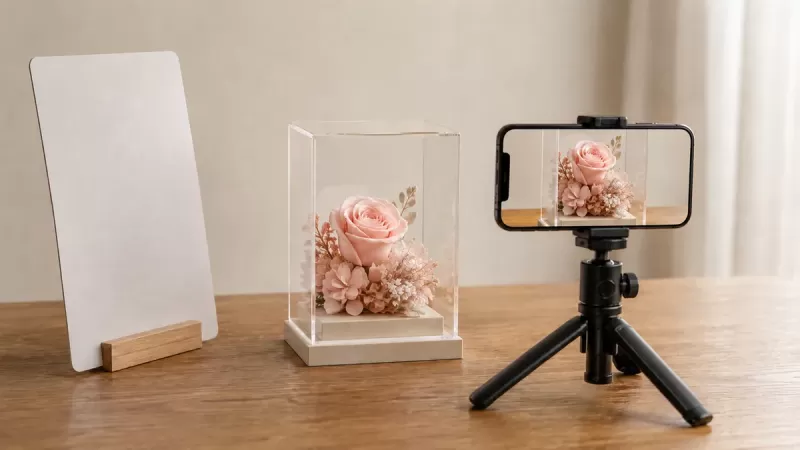
To photograph preserved flowers with your phone, start with a stable indoor setup, soft light, and a plain background. Focus on the flowers rather than the clear cover, then adjust your position until reflections no longer hide important details. Take a complete display view as well as close-ups, and keep an unedited original when the pictures will be used as a reference.
This guide is for photographing a finished gift or floral keepsake, not for making preserved flowers or repairing a display. It is also useful when you want to explain a design idea to FLOWEROF. A good photograph should help another person understand the object; it should not make a different color, size, condition, or service appear to be available.
Editorial review: 8 September 2026. The featured image is an AI-generated conceptual illustration of flower photography, not a photograph of a specific FLOWEROF product or a promise of included accessories.
Decide what the photograph needs to explain
Before changing camera settings, write down the purpose of the picture. A gift announcement might emphasize the whole arrangement. A reference for a personalized frame needs readable characters and a clear explanation of the detail you like. A question about an existing display needs context as well as a close-up. These are different jobs, so one dramatic photograph is unlikely to do them all.
Try this three-picture brief: one image showing the entire object, one showing its depth or enclosure, and one showing the particular detail you want to discuss. This is a practical editorial checklist, not a required submission format. If you are comparing preserved flower displays, keep the product name and written dimensions beside your pictures. Photographic framing alone is not a measurement.
For example, a tightly cropped heart arrangement can explain petal color but conceal its base. An angled frame view can reveal depth but make the lettering harder to read. Choose a straightforward first image, then use the additional views to answer the remaining questions.
Set up the display without taking it apart
Work on a clear, stable surface where the complete base is supported. Leave enough room to move yourself and the phone without reaching over the flowers. Keep a separate place for the phone support and any background card. Do not balance equipment on the display, lean a card against delicate floral elements, or remove a fixed cover just to simplify the shot.
Follow the care instructions for the actual item. FLOWEROF's acrylic rose box care guide is the place for cleaning and handling advice; photography is not a reason to experiment with mist, polish, hairspray, or a coating. If a cover cannot be cleaned according to its instructions, show its current condition and explain it instead of improvising a treatment.
Plan the camera position first. A clear walking route and a supported object are more useful than an elaborate arrangement of props. Return the display to its normal appropriate location when you finish, rather than leaving it in a temporary photography spot.
Begin with soft light and a simple background
A bright but indirect indoor window position is a useful starting point. Check the actual light on the petals rather than assuming every window is suitable. In Nikon's flower photography discussion with Randy Ziegler, soft overcast light helps reveal floral detail without distracting crossed shadows. The same low-contrast starting point is worth trying for a small indoor arrangement; this is an application of a photography principle, not a product test.
Place a plain background behind the display and remove unrelated objects from the picture. Take a test photograph before adding anything else. If one side disappears into shadow, try an independently supported white card outside the frame and compare the result. You do not need to buy specialist equipment before finding out whether this basic setup answers your question.
North Van Arts' artwork photography guidance independently discusses softened lighting, glare, a stable camera support, and keeping a reference file. Its examples concern artwork, not preserved-flower durability. Do not transfer its older device-specific statements or submission file limits to a modern phone or the FLOWEROF upload form.
Control reflections by watching the phone preview
A bright patch on the front of a display may be a reflection rather than a pale flower. Before increasing brightness, move the phone a little to either side and watch whether the patch moves across the cover. Then try moving the background or reflector. Change one thing at a time so you can identify what helped.
The Society of Photographers' guide to photographing glass explains how surrounding light and dark surfaces affect the appearance of a transparent object. It emphasizes judging those effects from the camera position. Combined with the North Van Arts reflection guidance, this supports checking the surroundings instead of simply adding more light. Glass examples do not prove that every acrylic cover will respond identically.
For your own display, compare a straight-on view with a slight angle and keep the one that reveals the relevant detail. You do not have to remove every edge highlight: the enclosure should still be recognizable. If an angle makes a rectangular frame appear distorted, retain a separate front view to communicate its shape.
Get the important detail in focus
Tap the flower or lettering that matters in your phone's preview. On iPhone, Apple's camera guide documents tap-to-focus, exposure adjustment, focus/exposure locking, a timer, and grid or level controls. Android controls and individual models vary; use the equivalent documented functions on your device rather than following an exact button sequence intended for another phone.
If the flower remains soft, move back slightly and try again. Nikon's close-up photography guide explains that a lens cannot focus sharply inside its closest focusing distance. It also recommends a tripod when available. Together with the independent stable-support guidance above, this makes a supported phone and a little more working distance sensible first checks before buying a macro accessory.
Review the saved photograph, not only the live preview. Enlarge the detail you need to communicate: a rose's edge, the join between two characters, or the border of a frame. If the surrounding objects are sharp but that detail is not, select the subject again and retake the image. Keep the object still while you adjust the camera.
Make a small, purposeful picture set
The following is a suggested shot list you can adapt. It is not a promise that every view is possible without reflections, or that a particular upload field accepts several files.
| Picture | What to show | What to check |
|---|---|---|
| Complete front view | Flowers, outer frame or box, and base | No important edge or character is cropped out |
| Slightly angled view | Depth, enclosure, and arrangement structure | Explain that perspective is not an exact dimension |
| Detail view | The color, character, or feature under discussion | Focus is on that feature, not the cover |
| Context view, if useful | The intended display area | Remove private information and unrelated people |
Name the files so someone can follow the sequence, for example flower-frame-front, flower-frame-side, and flower-frame-detail. Add a short written note identifying the question each picture answers. This is more useful than sending ten almost identical views with no indication of what matters.
Use references honestly when discussing a custom gift
The white personalized flower number frame currently offers a file field described as an idea diagram. That does not establish a photo-printing service, an exact color-match promise, or an included approval round. A photograph can accompany an explanation of an idea only after the relevant file and customization requirements are confirmed.
Keep the reference purpose narrow: perhaps you like a color family, the position of a decorative element, or the spacing between two characters. Write that intention explicitly instead of asking the maker to reproduce every visible feature of somebody else's design. Use pictures you own or have permission to share. Avoid including faces, shipping labels, financial information, or unrelated private material in a reference.
For the ordering controls themselves, follow the separate flower frame customization guide. This photography article does not replace those steps. If the file type, size, exact layout, or proposed use of an image is important, ask FLOWEROF before ordering.
Keep an untouched original and make edits on a copy. For a factual reference, avoid recoloring petals, removing damage, or adding generated flowers. Label a creative mock-up as a mock-up, and send a separate unaltered photograph when the actual appearance matters. A small set of clearly described images is a starting point for a conversation, not an approval or production commitment.
Frequently asked questions
Why does the camera focus on the clear box instead of the flowers?
Try selecting the flower in the preview and change position if a reflection covers it. Move back if you are too close for the lens to focus. Check the saved result before assuming a different camera is needed.
Should I remove the cover to avoid reflections?
Do not dismantle a finished floral display for a photograph. Work with the camera angle and surrounding surfaces first, and follow the item's actual handling instructions.
Do I need a professional camera?
Start with the phone you have and evaluate whether the pictures clearly answer your question. A readable reference and an artistic close-up have different requirements. Specialist equipment is not the first step in this workflow.
Should I use portrait mode?
Compare it with an ordinary photo. For a reference, keep whichever image shows the necessary frame edges and floral details clearly. A stylized background is less important than communicating the complete object.
Can a photograph guarantee the finished flower color?
No. Treat the image as a reference, record the selected color-option name, and ask about any essential matching requirement. Do not treat a screen image or an edited mock-up as written confirmation of production details.
What should I do before sending the pictures?
Check focus, complete-object context, truthful editing, privacy, file requirements, and a short explanation of what you want to discuss. Keep your original files. These checks prepare a useful reference but do not confirm that a service or request has been accepted.
Scope and source notes
The linked Apple and Nikon material supports camera controls and basic photographic principles. North Van Arts and the Society of Photographers independently support attention to lighting, reflection, and camera position. The shot list and reference-message workflow are FLOWEROF editorial suggestions, not reported experiments. Product-upload information was checked on 8 September 2026. No source here establishes flower lifespan, safety, sustainability, exact color reproduction, or a delivery guarantee.
Leave a comment