-36x36.jpg)



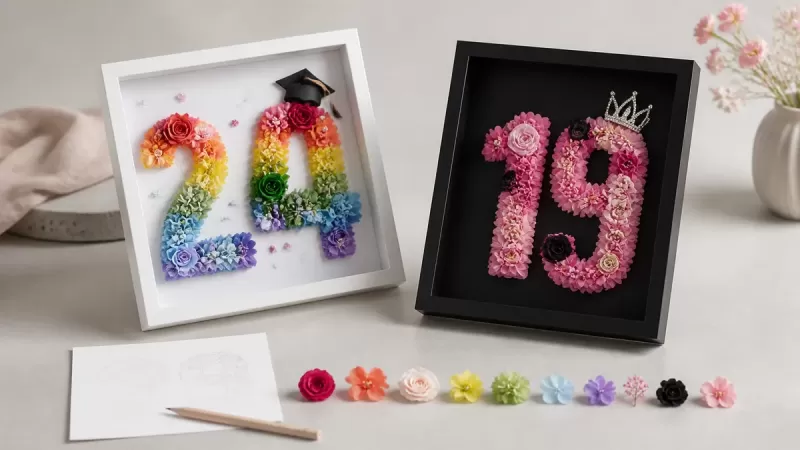
To customize a FLOWEROF preserved flower frame, choose the white or black 23 脳 32 cm frame, select one of eight flower-color families, enter no more than two numbers or letters, add a message, choose any optional decorations and upload an idea diagram only when it helps explain the layout. Review every field before checkout because the current product pages do not document an included digital proof or revision round.
The current upload control is a general file field labeled for an idea diagram. It does not publish accepted file types or sizes, and it does not confirm that a photograph will be printed. Contact FLOWEROF before ordering when a file, special character, exact layout or approval step is essential.
Fact checked: 27 August 2026. Product options and operating times can change, so the selected live form and current written confirmation remain the final sources.
The real customization workflow at a glance
| Step | Current choice | Check before continuing |
|---|---|---|
| 1. Frame | White SKU RFWF532901 or black SKU RFWF532902 | 23 脳 32 cm space and preferred contrast |
| 2. Flower color | Multicolor, Red-Pink, Pink, Red, Blue, Dark blue, Purple or Blue-Purple | Selected text label and matching product image |
| 3. Main characters | Up to two numbers or letters | Order, capitalization and meaning |
| 4. Message | Message or blessing field | Spelling, dates and readable length |
| 5. Decorations | Crowns, butterflies, mermaid tail or doctoral hat currently listed | Exact option name, placement and current surcharge |
| 6. Upload | Optional idea diagram | Accepted file type and whether the file is reference-only |
| 7. Approval | No included proof or revision round currently documented | Request written confirmation when approval is required |
| 8. Order | Save the selected configuration and checkout record | Current price, stock, production, shipping and policies |
This workflow is narrower than a fully bespoke art commission. It uses the controls currently shown on two product pages. Browse the custom preserved flowers collection first, then choose the product whose frame color fits the intended design.
Step 1: choose the white or black frame
White frame
The white personalized flower frame is SKU RFWF532901. Its current URL says 鈥減hoto frame,鈥?but the verified form is for a floral number or letter design. Use the live URL until the prepared clean redirect is published, and do not infer photo printing from the old address.
Black frame
The black personalized flower frame is SKU RFWF532902. The dark border creates stronger contrast, but the product is not limited to memorial use. It can also mark a birthday, anniversary, graduation or another milestone.
Both frames are listed at approximately 23 脳 32 cm. Measure the complete display location, including clearance around the frame, instead of judging size from a product photograph.
Step 2: select and record the flower color
The current option names are Multicolor, Red-Pink, Pink, Red, Blue, Dark blue, Purple and Blue-Purple. These exact labels matter because 鈥渂lue鈥?and 鈥渄ark blue,鈥?or 鈥減urple鈥?and 鈥渂lue-purple,鈥?are separate selections.
Choose from the recipient's preferences and intended room rather than assigning a universal meaning. The preserved rose color guide explains common associations and their cultural limits.
Record the written option name as well as saving an image. The W3C guidance on use of color explains why information should not depend on color differences alone. Text labels also reduce mistakes when screens, lighting or color vision make two choices look similar.
Step 3: choose no more than two characters
The main field accepts up to two numbers or letters. Use it for an age, a pair of initials, a short year or another two-character milestone. Do not place a full name or sentence in this field.
- Write the characters in the exact order required.
- Confirm whether uppercase or lowercase appearance matters.
- Use the message field to explain an ambiguous number or abbreviation.
- Ask before using punctuation, accented characters or non-Latin scripts because the supported character set is not published.
- Have another person check dates, initials and number order.
Step 4: add a concise message
The separate message or blessing field can carry a name, date, short greeting or layout instruction. The current page does not publish a character limit, typeface, line count or guaranteed placement. Keep the essential message concise and distinguish words meant to appear in the design from production notes.
A useful entry can follow this structure:
- Text to display: the exact wording, capitalization and punctuation.
- Occasion: birthday, anniversary, graduation, remembrance or another milestone.
- Layout note: a short explanation that corresponds to the uploaded diagram.
- Approval requirement: a direct request for confirmation before production, when needed.
Do not put card-payment details, identity documents or unrelated sensitive information in a message or upload.
Step 5: choose optional decorations carefully
The current forms list Crown-1, Crown-2, Left Butterfly-1, Right Butterfly-1, Left Butterfly-2, Right Butterfly-2, one Mermaid Tail and a Doctoral Hat. Each currently displays a surcharge, but the amount and availability must be rechecked on the selected product.
Choose a decoration because it supports the occasion, not because every available field must be filled. A doctoral hat can clarify a graduation year. A crown or butterfly may suit a birthday design. When left or right placement matters, record the complete option label and show the same direction in the idea diagram.
Step 6: create a simple idea diagram
An idea diagram should communicate the requested structure without pretending to be a production-ready artwork file. A clear hand sketch or digital layout can show:
- The two main characters in reading order
- The preferred flower-color family written as text
- The approximate position of each decoration
- The text that should appear, separated from instructions
- Any aspect that must be confirmed before production
The form does not currently publish accepted formats, maximum file size, color profile or minimum resolution. Ask through the contact page before preparing a large or unusual file. The upload is not evidence that the uploaded image itself will appear in the finished frame.
Step 7: decide whether you need a proof
A digital proof can be important when the exact text, direction or decoration placement determines whether the frame is usable. However, the current product pages do not document an included proof, number of revisions or a production hold while approval is pending.
Before payment, ask:
- Will a layout preview be supplied?
- Which choices will the preview show?
- How many changes are permitted?
- When does the order become final?
- Will production wait for written approval?
UK government guidance for online selling says sellers should list the steps involved in placing an order and take reasonable steps to let customers correct errors. FLOWEROF's live form shows the available fields, but a file upload or message field should not be treated as proof of an undocumented preview or revision service.
Original planning examples
The examples below illustrate how to complete the fields. They are not finished-design guarantees, inventory statements or promises that every placement will be accepted.
| Occasion | Characters | Color direction | Decoration idea | Message check |
|---|---|---|---|---|
| 18th birthday | 18 | Pink | One crown | Name and event date checked |
| 50th anniversary | 50 | Red-Pink | Left and right butterflies | Couple's names and anniversary date checked |
| Graduation year | 26 | Blue-Purple | Doctoral Hat | Full year explained in the message |
| Two initials | AB | Multicolor | None | Initial order confirmed |
| 10th milestone | 10 | Dark blue | None | Occasion stated so the number is not ambiguous |
For remembrance wording and family approval, use the separate preserved flower memorial frame guide. This process article focuses on the customization form across all occasions.
Step 8: review and save the order record
Before adding the frame to the cart, read the complete configuration aloud or ask another person to compare it with the idea diagram. Save a screenshot or written record showing:
- Product URL, SKU and frame color
- Flower-color option name
- Two main characters
- Complete message
- Every decoration and current surcharge
- Uploaded filename
- Any written confirmation about proofing or special characters
Then check the current price, stock, production time, delivery estimate, customs responsibility, cancellation terms and personalized-item return conditions. Do not rely on a search snippet or an earlier screenshot for a time-sensitive order.
What happens after the order?
FLOWEROF's current delivery information states a made-to-order production estimate of 3鈥? business days. It separately lists estimated transit of 7鈥?5 business days for UPS Standard and 3鈥? business days for FedEx Priority, and recommends placing time-sensitive orders at least 10鈥?4 days ahead.
Those figures are current estimates, not an arrival guarantee. A requested proof, unanswered question, customs clearance or carrier disruption may affect timing. Confirm the schedule in writing when the frame is needed for a fixed date.
Care after delivery
Display the frame indoors in a dry position away from direct sunlight and heat. Do not water or mist the flowers. Florever's preserved-flower guidance warns that water, sunlight and humidity can damage petals or cause color to fade, run or transfer.
The guide to how long preserved flowers last explains why gradual color and texture change depends on materials and display conditions rather than one universal expiration date.
Frequently asked questions
How many letters or numbers can I add?
The current main field supports no more than two numbers or letters. Ask before using punctuation, accented characters or other scripts.
Which flower colors are available?
The current labels are Multicolor, Red-Pink, Pink, Red, Blue, Dark blue, Purple and Blue-Purple. Recheck the selected product form because options can change.
Can I upload a photograph?
The form accepts a file for an idea diagram, but it does not document photo printing or accepted file specifications. Obtain written confirmation before sending a photograph for production.
Will FLOWEROF send a proof?
An included proof and revision round are not currently documented. Ask before ordering when production must wait for your approval.
Can I combine several decorations?
The form shows several decoration controls, but confirm the intended combination, placement, current surcharge and availability on the selected product.
How long will customization take?
The current delivery page states an estimated 3鈥? business days for production before transit. Recheck the schedule for the actual order and do not treat an estimate as a guaranteed completion date.
Do the preserved flowers need water?
No. Keep the design dry and away from direct sunlight, humidity and heat.
Sources and editorial notes
- W3C Web Accessibility Initiative: Understanding Use of Color
- GOV.UK: Online and Distance Selling - Online Selling
- Florever: Care and Handling for Preserved Flowers
Product dimensions, SKUs, color labels, character limit, message field, decoration names, upload label and current delivery estimates were checked against FLOWEROF's live pages on 27 August 2026. External sources support accessible color labeling, clear online ordering steps and general flower care. They do not substantiate stock, exact flower placement, accepted upload formats, proofing, revisions, production capacity or delivery guarantees.
Leave a comment